Warehouse & Logistics Management System
Custom warehouse and logistics module built for DIC Fine Chemicals Pvt. Ltd., covering batch palletisation with sequenced pallet codes and QR labels, warehouse and location masters with QR codes, pallet location mapping and stock...
Overview
Every pallet numbered, labelled and accounted for
Div Systems built the warehouse and logistics module of DIC Fine Chemicals' plant software, covering finished goods from the moment a batch is palletised to the moment the pallet is scanned onto an export order.
Production creates pallets against a batch. Each pallet gets a QR label and a code that shows its place in the run. The store team maps it to a warehouse location. Orders are imported, pallets are allocated to order lines, and loading is checked by scan. A batch that fails a check can be held at any point, and every pallet keeps a history.
The module sits inside the same application as purchase requests, material issue, goods receipt, shift reports and raw material management, so warehouse data and plant data share one system.
- Speciality chemicals
- Pallet-level tracking
- QR labelling
- Export order loading
- Batch hold and release
Business need
The operational challenge
A chemicals plant ships finished goods in drums, barrels, pails and tubes stacked on pallets, often to export destinations where the paperwork has to match the truck. Stock counted as a total per product cannot say which batch is on which pallet, where that pallet sits, or whether it has already been promised to an order.
Quality adds another constraint. When a batch is questioned, every pallet from that batch has to be found and kept off outgoing loads until someone with authority releases it, and the reason for both decisions needs to be on record.
DIC Fine Chemicals needed a system that could:
- Create pallets directly from a production batch
- Give every pallet a unique code and QR label
- Map pallets to warehouses and locations
- Show what is in stock and what is out for order
- Import export orders instead of retyping them
- Allocate specific pallets to each order line
- Check loading by scan and flag what is missing
- Hold and release batches with reasons on record
Our solution
The pallet is the unit of record
Everything in the module hangs off the pallet. It is created against a product and batch, carries its own quantity and net weight, is labelled with a QR code, and is mapped to a location. Orders do not ask for a quantity of product. They list the pallets that will go.
That single choice makes the rest simple. Stock position is a filter over pallets. Allocation is a pallet number on an order line. A batch hold finds its pallets by batch. And a pallet number is enough to pull up who made it, when, and where it has been.
Pallet codes also record their place in the run, such as 2 of 3, so a gap in a sequence shows on the list before anyone goes looking on the floor.
Key features
Built for a finished goods warehouse
Product master with pallet rules
SAP code, colour, weight and per pallet quantity per product, with live pallet count and total quantity.
Warehouses and locations
Warehouses with capacity, and locations inside them with their own capacity.
QR labels for locations
Every location prints a QR code, one at a time or in bulk.
Batch palletisation
One form creates all pallets for a batch with quantity, net weight and production time.
Sequenced pallet codes
Codes show their position in the run, such as 1 of 3, so gaps are visible.
QR labels for pallets
Each pallet prints its own QR label as soon as it is created.
Location mapping
Pallets are mapped to a location, recording who mapped them and when.
Stock filters that match the job
Filter by mapping pending or done, active or deleted, and in stock or out for order.
Batch report download
Download a batch report straight from the filtered pallet list.
Order import
Orders come in from a spreadsheet, with a sample file to follow.
Pallet allocation per line
Each order line names the SAP number, product, pallet number and batch.
Loading and scanned lists
Pallet list, loading list and scanned list print for every order, with a pending scan flag.
Batch hold and unhold
Holds and releases both record a reason, the person and the time.
Pallet history lookup
Pallet details, QR label and location history from a single pallet number.
Export everywhere
Lists export to CSV, Excel and PDF, or print directly.
Inside the platform
Module walkthrough
Screens from the Ware House Management menu of the live system, shown with sample data. Product codes, batches, order numbers, destinations and names are replaced; layout, fields and workflow are unchanged.
Products that know how they are palletised
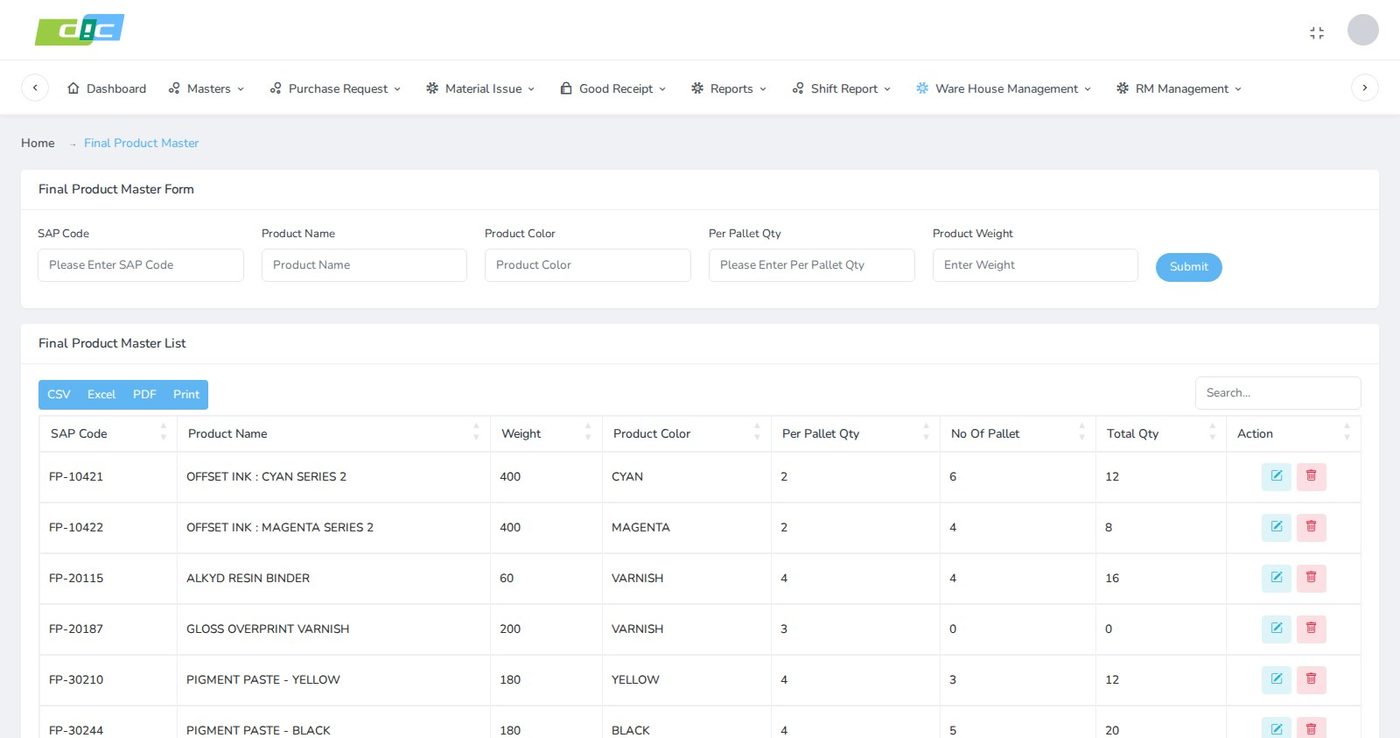
The final product master holds the SAP code, product name, colour, per pallet quantity and product weight. The list beside it shows the number of pallets and total quantity currently held for each product, so the master doubles as a quick stock view.
Storing per pallet quantity on the product means the pallet form does not rely on the operator remembering how many drums, pails or tubes go on one pallet of a given item.
A QR label on every rack and bay
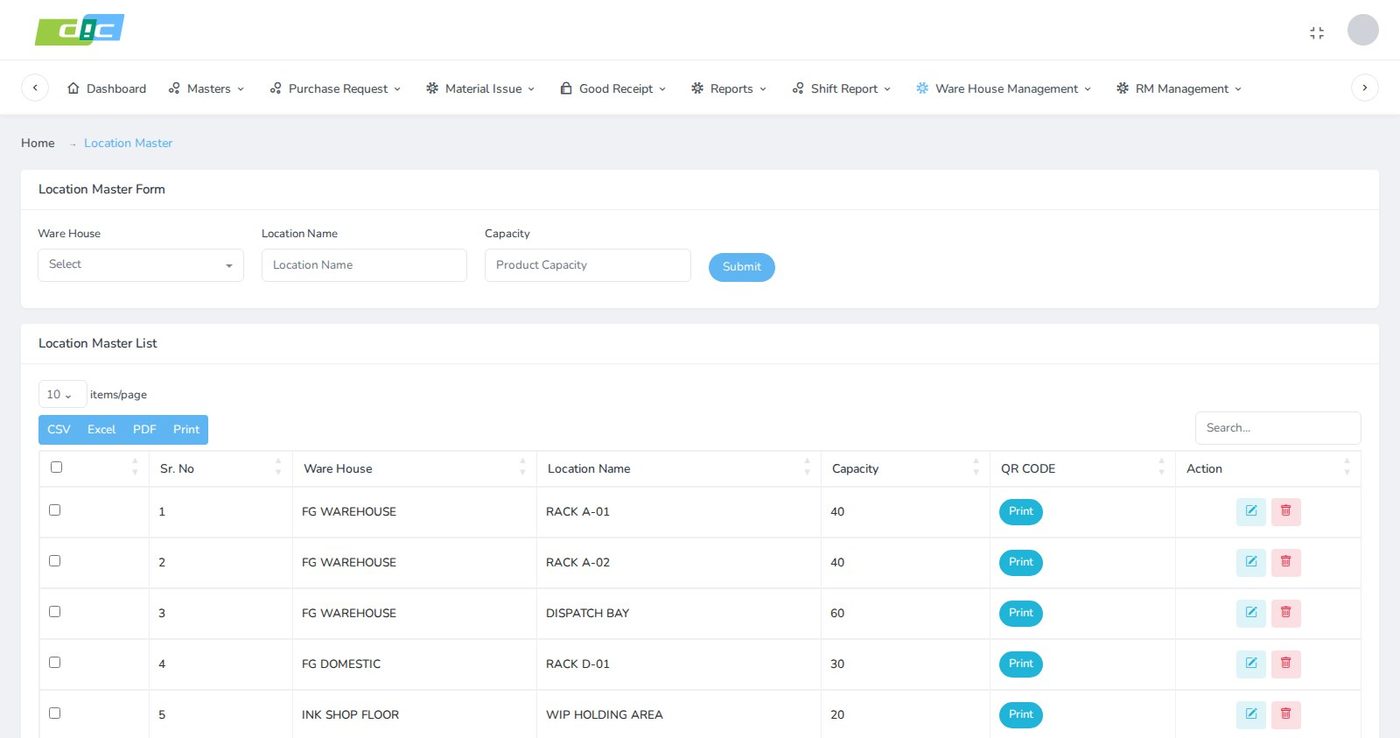
Warehouses are defined with a name and capacity, and locations are created inside them with their own capacity. The set covers finished goods and raw material warehouses, domestic stores, the ink shop floor and plant work in progress.
Each location prints its own QR code, individually or in bulk from the checkbox selection, so a location can be scanned rather than typed when a pallet is put away.
From a production batch to numbered pallets
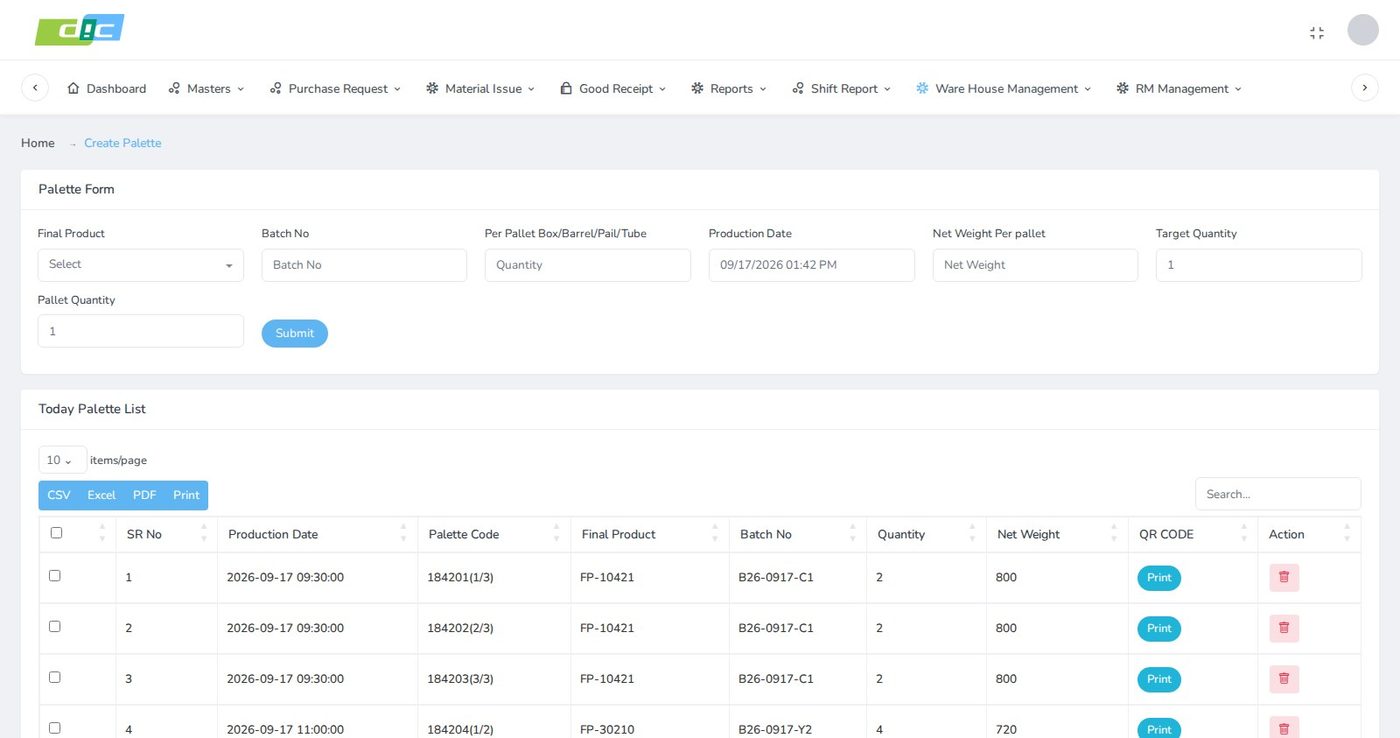
The palette form takes the final product, batch number, quantity per pallet (box, barrel, pail or tube), production date and time, net weight per pallet, target quantity and pallet quantity. Submitting it creates the pallets for that batch in one step.
Each pallet code carries its position in the run, for example 1 of 3, 2 of 3 and 3 of 3. A missing pallet is therefore visible from the codes themselves. Today's pallets are listed underneath with a QR label print for each.
Where every pallet is, and whether it is free
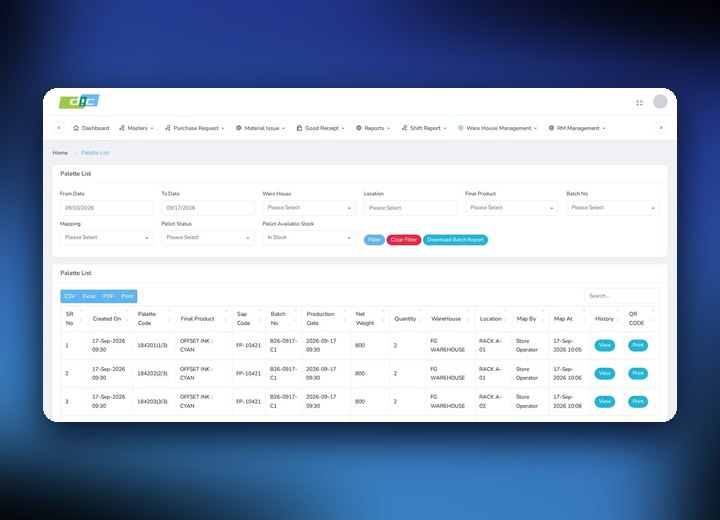
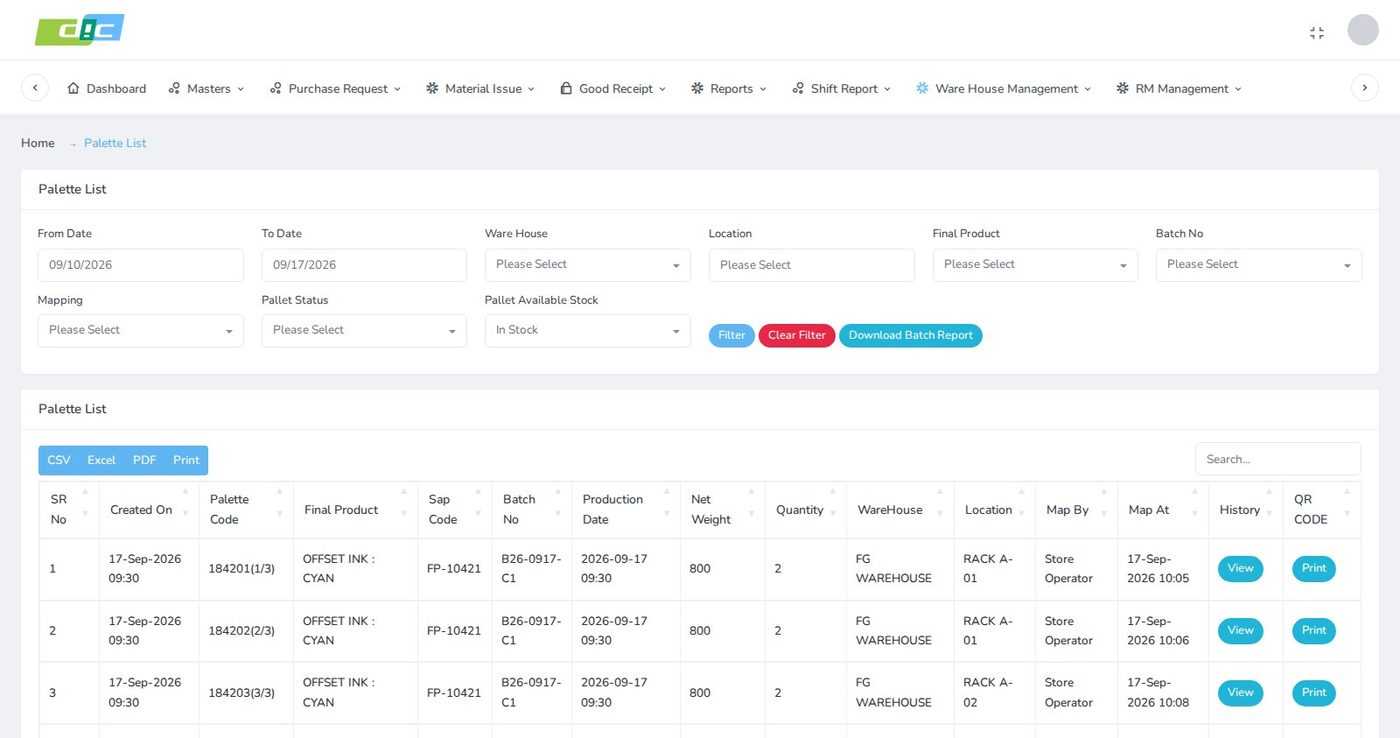
The palette location list filters by date range, warehouse, location, final product and batch, and adds three filters that answer day-to-day questions: mapping (done or pending), pallet status (active or deleted) and available stock (in stock or out for order).
Each row shows the pallet code, product, SAP code, batch, production date, net weight, quantity, warehouse and location, with who mapped it and when. A batch report downloads from the same screen.
Import the order, then load against it
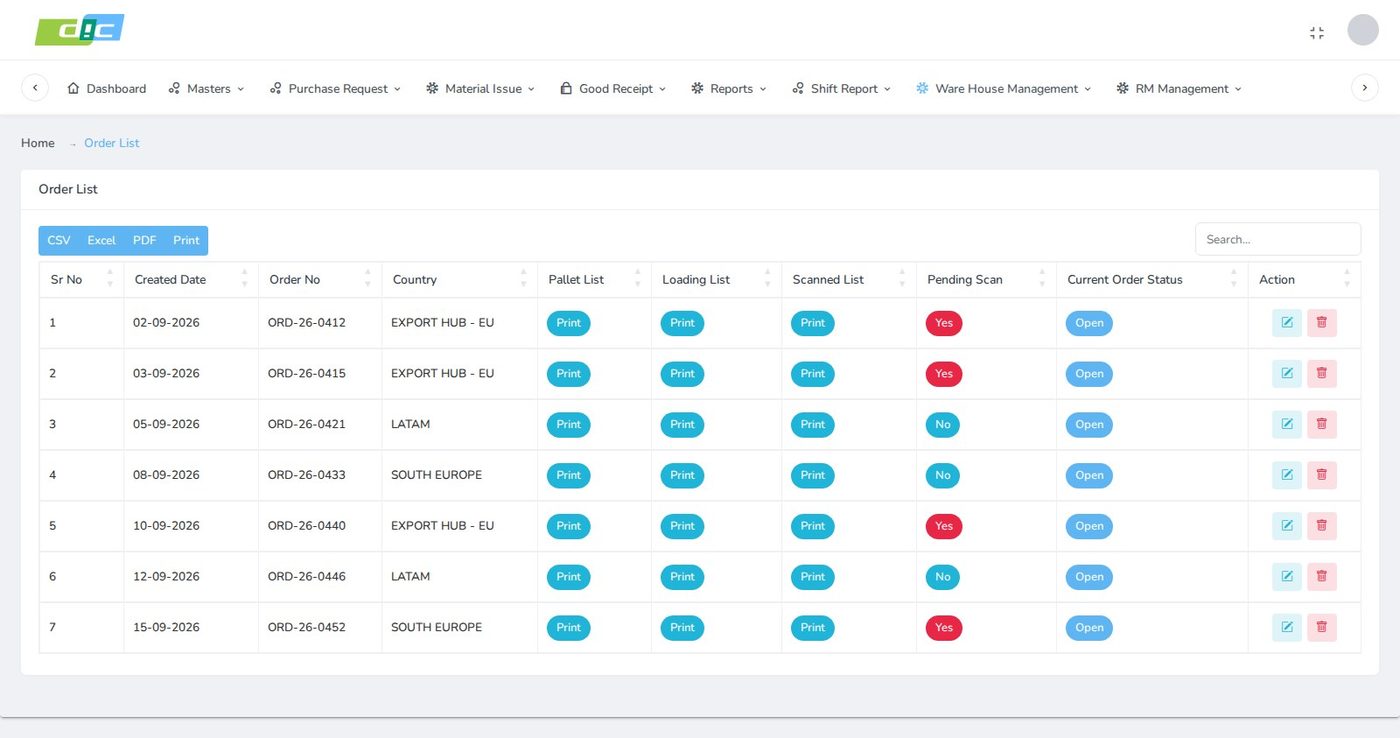
Orders are imported from a spreadsheet using a downloadable sample file, rather than keyed in line by line. The order list then shows each order number, destination country and current status.
Three print-outs hang off every order: the pallet list, the loading list and the scanned list. A pending scan flag shows at a glance which orders still have pallets that have not been scanned at loading.
Specific pallets against each order line
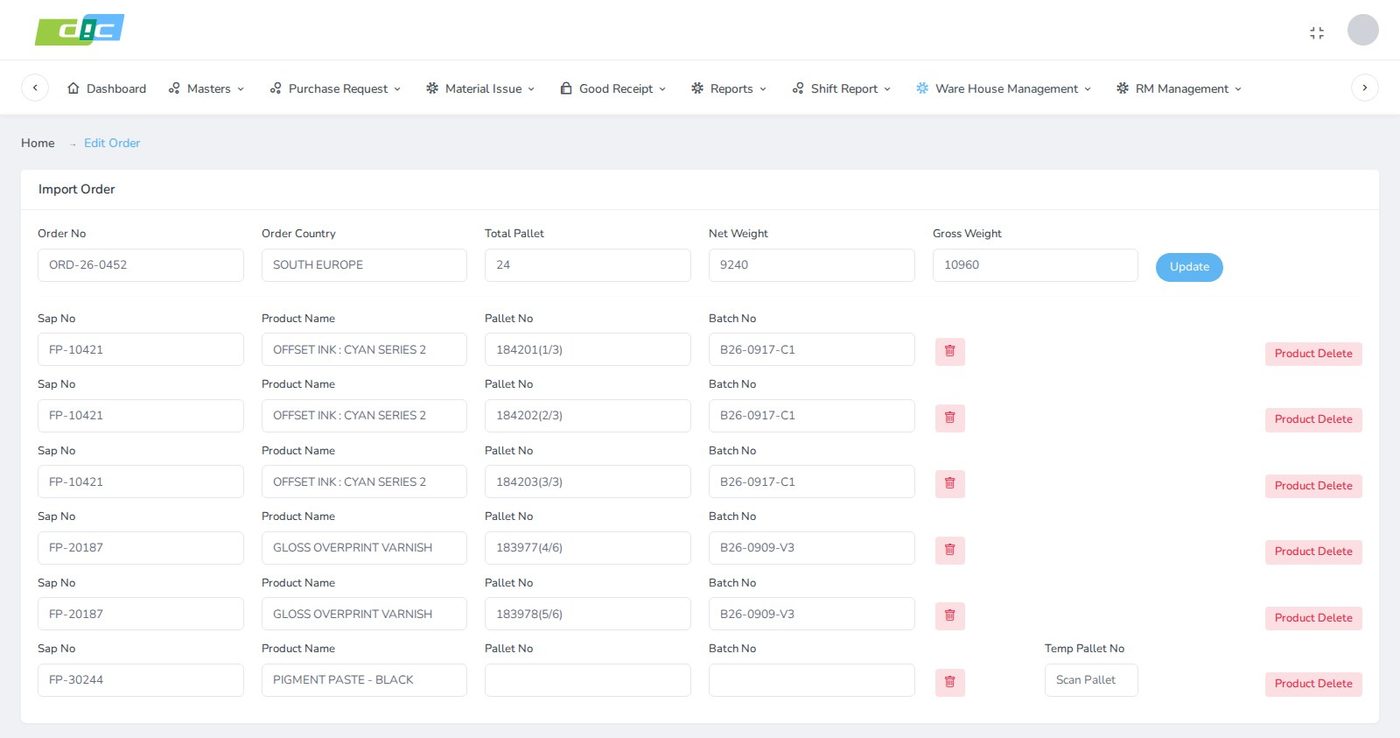
Inside an order the header holds the order number, country, total pallets, net weight and gross weight. Each line pairs a SAP number and product with the pallet number and batch allocated to it, and lines can be removed or re-pointed.
The printed pallet list groups lines by product with pallet type, net and gross weight, warehouse, location and a check column, with product subtotals and order totals for pallet count, net quantity and gross quantity.
Stop a batch before it reaches a truck
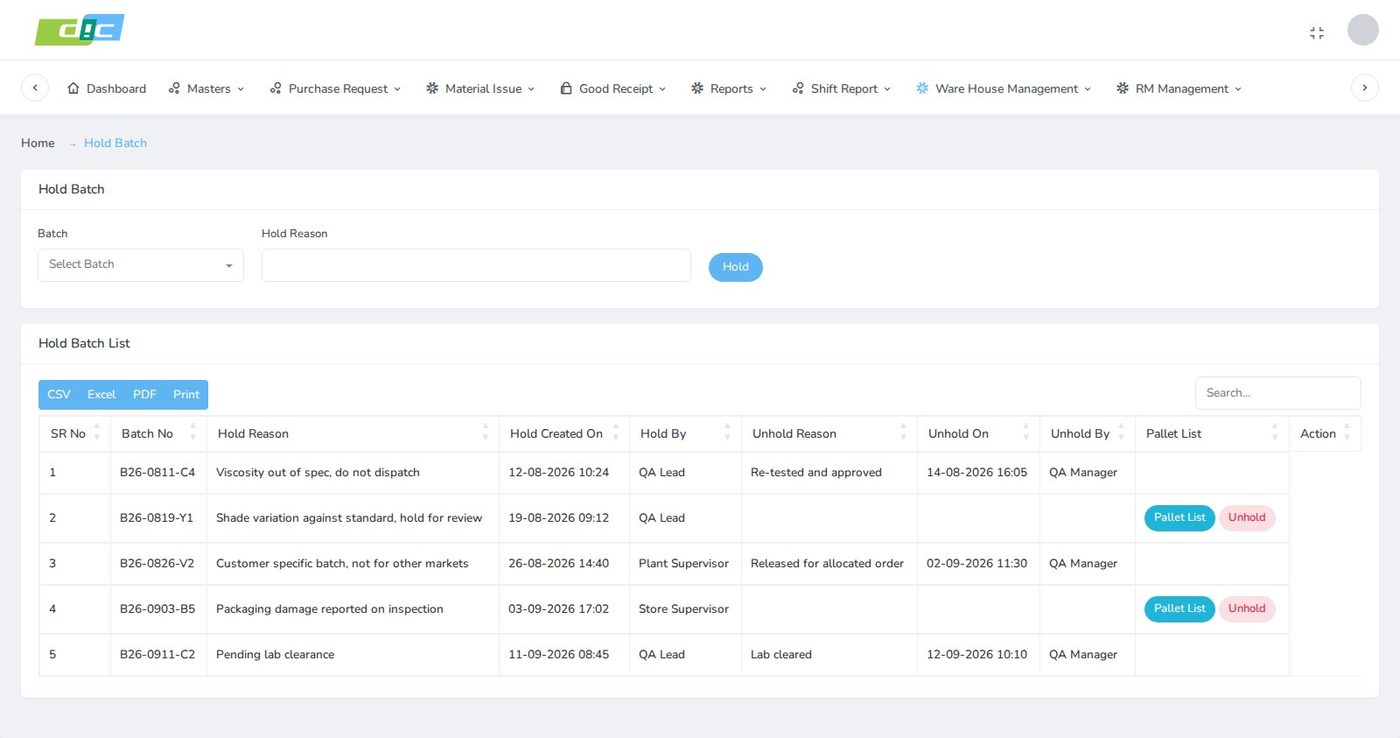
A batch can be put on hold with a written reason. The hold batch list records who placed the hold and when, and, once lifted, the unhold reason, who lifted it and when.
While a hold is open the row links to the pallet list for that batch, so the affected pallets can be found on the floor, and the unhold action sits on the same row.
One pallet number, its whole story
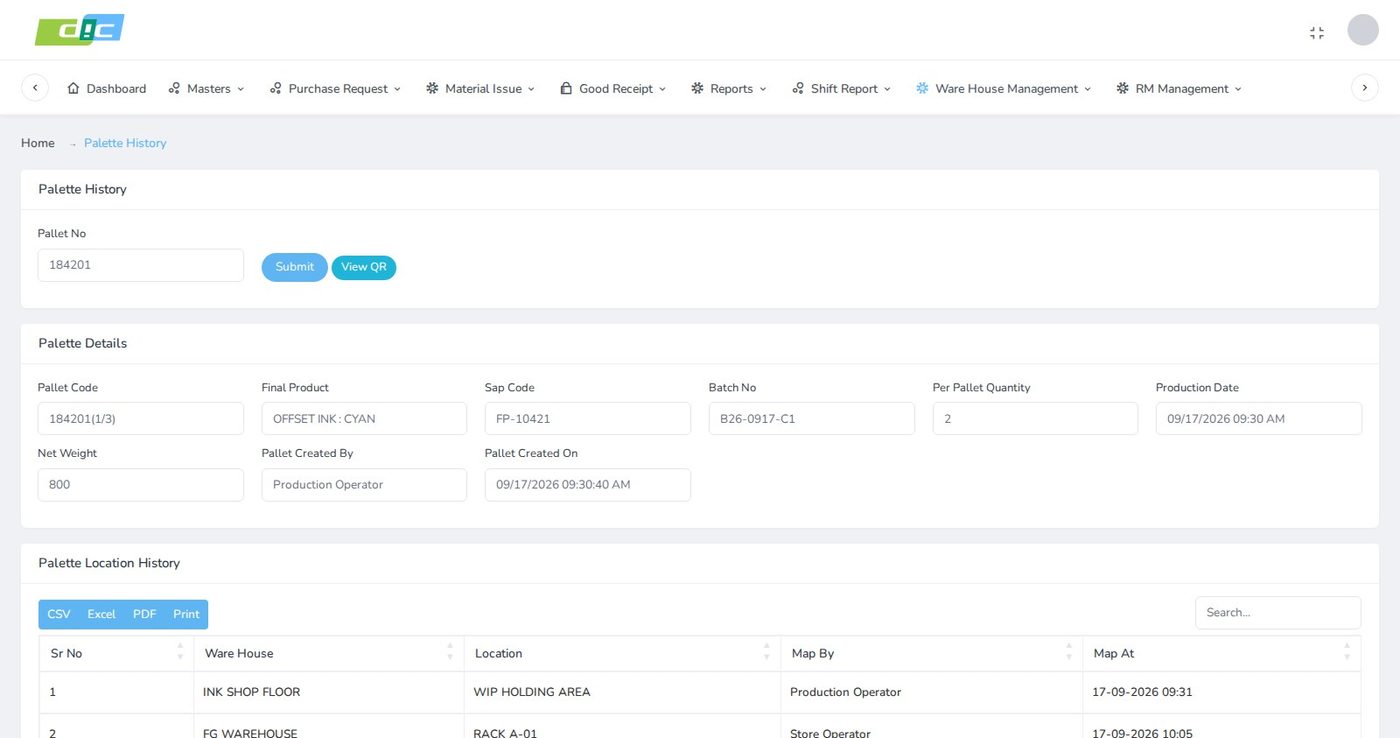
Entering a pallet number returns its details: pallet code, final product, SAP code, batch, per pallet quantity, production date, net weight, and who created it and when. The QR label can be viewed again from here.
Below the details sits the pallet's location history, so a question about where a pallet has been answers itself without asking the store team.
End to end
Batch to truck
A pallet is tracked from the production line to the loading bay, with a hold available at every step.
Impact
Operational gains
and per location
loading and scanned lists
on record, hold and release
CSV, Excel, PDF, print
Stock is known by pallet. Product, batch, location and availability are visible for each pallet, not only as a total.
Put-away gaps show up. The mapping pending filter lists pallets that exist but have not been placed.
Orders are not retyped. Importing from a spreadsheet removes a manual step and the errors that come with it.
Loading is checked. The pending scan flag shows which orders still have unscanned pallets before the truck leaves.
Quality decisions stick. A held batch carries its reason and owner until someone records the release.
Questions answer themselves. A pallet number returns who made it, when, and where it has been.
Engineering approach
Design decisions worth explaining
Pallet, not product total
Tracking the pallet as the unit is what makes allocation, holds and history work without extra bookkeeping.
Pallet rules on the product
Per pallet quantity lives in the product master, so palletisation follows the product rather than the operator's memory.
Codes that show the sequence
Writing "2 of 3" into the code makes a missing pallet visible on any list or label.
Mapping as a separate step
Creating a pallet and placing it are recorded apart, so unplaced stock can be listed and chased.
Holds at batch level
Quality problems belong to a batch, so a single hold covers every pallet made from it.
Inside the plant system
Warehouse screens share one application with goods receipt, material issue and shift reports, so there is no second system to keep in step.
Common questions
Pallet tracking in a chemicals warehouse
Why track pallets rather than total stock per product?
Because the questions a finished goods warehouse gets are about specific goods: which batch is on this pallet, where it is, and whether it is already allocated to an order. A product total cannot answer any of those. Pallet-level records can, and they also make batch holds and dispatch checks possible.
How are pallets and locations identified on the floor?
Each pallet gets a QR label when it is created, and each warehouse location has its own printable QR code. Pallet codes also include their position in the batch run, such as 1 of 3, so a missing pallet is obvious from the sequence.
How does the system stop a held batch from being dispatched?
A batch is placed on hold with a reason, and the hold list links to the pallets from that batch so they can be found. The hold stays on record with the person and time until someone records an unhold with its own reason.
Do orders have to be typed in manually?
No. Orders are imported from a spreadsheet using a sample file provided in the system. Pallets are then allocated to each order line, and the pallet list, loading list and scanned list print from the order.
Can this module work alongside other plant software?
In this project it runs inside the same application as purchase requests, material issue, goods receipt, shift reports and raw material management. Products and SAP codes are shared, so warehouse records use the same references as the rest of the plant.
Can it be adapted to another manufacturer?
Yes. Products, pallet quantities, warehouses, locations and capacities are all master data. A plant with different packaging or storage areas is set up through those masters rather than by rewriting the module.
Why Div Systems
Software shaped around how you already work
We build plant and warehouse systems around the way goods actually move on your floor, without proprietary licence costs and without asking your team to change a process that already works. If your stock is still counted in totals and checked on paper at the loading bay, we can help.
Start your project